
MiSUCO Touch Synth FREE1.04 - Get APK
You'll be able to download in few seconds.
Publisher Description
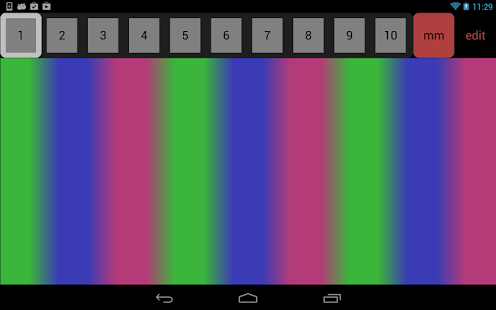
osc (Open Sound Control)/MIDI controller with musical scale generator and simple synthesizer.
Experience microtonal tuning in a way that was never available before.
Explore the universe of musical scales and microtonal tunings on the built in synth or on any external synth that you can connect trough wlan and a computer. The MISUCO app has interfaces to common music software such as Max/MSP, Reaktor, puredata, supercollider. You can also control a conventional MIDI keyboard, if you have a computer with a MIDI interface. MISUCO is able to translate arbitrary frequencies into MIDI note number and pitch values.
The MISUCO software can also be used as a versatile touchscreen keyboard and controller and enables a maximum of the available screen for your performance.
What is microtonality?
In music normally we divide one octave in seven to twelve steps. You can see this on a piano, which has a repeating pattern of seven white and five black keys.
One form of microtonal tuning divides one octave in 1200 steps called cents. This system is used to explain fine tunings of instruments.
Another form is to pull the strings of an instrument. Then the note is detuned to some frequency between the scale. This form of playing is essential in classical Indian music but also widely found in many other music playing styles.
How can you experience microtonality with MISUCO?
With the MISUCO software you can play with and experience these ways of microtonality. You can translate microtonality to regular MIDI instruments, using the free software puredata on your wlan equiped computer: MISUCO has a microtonal scale tuner, which lets you tune each note on an octave in cent steps. Then it has a microtonal mode (mm) that blurs the frequency space between the scale and you can play the frequencies between, like pulling a string of an instrument. If you do not like to use any external equipment and software, MISUCO has a simple but powerful built in synthesizer.
Last but not least MISUCO is a browser to the newly founded http://scales.misuco.org online scales archive. With one click on the ?-key you get directed to the page related to the current scale on your MISUCO where you can discuss, share and read about that scale.
Be aware that this app is mainly designed for tablets and running it on a device with smaller screen than 10" requires good eyes and tiny fingers.
FAQ: I hear no sound:
- Make sure your phone is not muted and the volume is up
- Press long, some sound have require some attack time
- Make sure you have at least version 1.01 installed
I wish you much inspiration, creativity, self development, fun and inner peace with MISUCO.
If you like the project, please support further developments trough our website http://misuco.org
Thank you very much!
Claudio Zopfi
The creator of MISUCO
Also available on iOS
About MiSUCO Touch Synth FREE
The company that develops MiSUCO Touch Synth FREE is misuco.org. The latest version released by its developer is 1.04.
To install MiSUCO Touch Synth FREE on your Android device, just click the green Continue To App button above to start the installation process. The app is listed on our website since 2015-02-23 and was downloaded 0 times. We have already checked if the download link is safe, however for your own protection we recommend that you scan the downloaded app with your antivirus. Your antivirus may detect the MiSUCO Touch Synth FREE as malware as malware if the download link to org.misuco.misuco.free is broken.
How to install MiSUCO Touch Synth FREE on your Android device:
- Click on the Continue To App button on our website. This will redirect you to Google Play.
- Once the MiSUCO Touch Synth FREE is shown in the Google Play listing of your Android device, you can start its download and installation. Tap on the Install button located below the search bar and to the right of the app icon.
- A pop-up window with the permissions required by MiSUCO Touch Synth FREE will be shown. Click on Accept to continue the process.
- MiSUCO Touch Synth FREE will be downloaded onto your device, displaying a progress. Once the download completes, the installation will start and you'll get a notification after the installation is finished.
Program Details
System requirements
Download information
Pricing
Version History
version 1.04
posted on 2015-02-23
Disclaimer
External Download
We do not host MiSUCO Touch Synth FREE on our servers. We did not scan it for viruses, adware, spyware or other type of malware. This app is hosted by Galad and passed their terms and conditions to be listed there. We recommend caution when installing it.
The APK Download link for MiSUCO Touch Synth FREE is provided to you by apps112.com without any warranties, representations or guarantees of any kind, so access it at your own risk.
If you have questions regarding this particular app contact the publisher directly. For questions about the functionalities of apps112.com contact us.
